Choosing an app
The best kakeibo app for iPhone
Every other page answering this question ranks apps its author has not opened. We publish one of them, which disqualifies us as a judge, so here is the thing that is actually transferable: what to check, and how our own app answers each check.
- Published
- 15 September 2026
- Written by
- The Kakeibo Method team
- Reading
- 8 minutes
- Filed under
- What you keep it in
The app we would point you at is our own, Kakeibo: Goal and Budget Planner, which makes us the last people you should accept a ranking from. So this page is a checklist instead: hand entry that takes seconds, the four categories named, the savings promise moved before the spending, a reflection that lives in the app, and a free tier whose limits are printed before you install.
That declaration is not a formality. We are the publisher of a product in the category you are shopping in, and a page from us scoring competitors out of ten would be an advertisement wearing a review's clothes. What we will not do is rate software we have not used. What we will do is state the checks, answer them honestly about our own app including the rows where the answer is no, and point you at the upstream question if you have not settled it yet: whether you need an app at all covers paper, a spreadsheet and a phone, and it is the better page to read first if you are not sure.
What makes an app a kakeibo app rather than a budget app
The App Store is full of budgeting software and almost none of it is built on this method. A generic budget app hands you an empty category list and asks you to invent a system, which is precisely the work kakeibo already did for you in 1904. So the first test is whether the four categories are in the product as categories, with their own names and their own meaning, or whether the word kakeibo is in the listing and nowhere else.
The second test is the order of operations. Kakeibo decides the savings promise before anything is planned and moves it out before the spending happens. A budget app that computes what you saved at the end of the month has inverted the method, and the inversion is not cosmetic: a savings amount decided last is competing against every purchase that came before it. If you have not met the method itself, it is set out in what is kakeibo.
The third test is whether the reflection exists at all. Most budgeting software ends at the chart. Kakeibo does not end at the chart: the month closes with four written questions, and an app that leaves that to a notebook you were supposed to keep separately has shipped two thirds of a method. The prompts themselves are in the four questions guide.
The checklist, in the order it is worth checking
Every one of these can be checked from the store listing, the screenshots and about ten minutes with the free tier. None of them requires you to trust a review.
- Entry in seconds. Count the taps from opening the app to a saved entry with an amount and a category. If it is more than a handful, the app will lose to your own impatience at a counter, and an entry that does not get made is worth nothing.
- The four categories, named. Survival, Optional, Culture and Extra should be in the product, not offered as a template you assemble. The working definitions are in the four categories guide.
- The savings promise first. There should be somewhere to record what you intend to save before the month, and the spending plan should be what is left after it.
- A safe to spend figure. The number kakeibo most wants you to see before an unsure purchase is what is genuinely left in that envelope today, not what you spent last week.
- The monthly reflection, inside the app. Four written questions at the close of the month, kept where the numbers are, so the answer sits next to the evidence.
- Hand entry rather than a bank feed. For this method specifically the entry is the intervention. The full argument is in kakeibo versus an app that connects to your bank.
- Limits printed before you install. Apple shows an In-App Purchases label on any listing that sells something. Read what the listing says the free tier holds and what the paid tier removes, and treat a listing that will not say as a listing that has decided not to.
- Your data, and where it goes. Check the privacy card on the listing. A ledger is a complete map of a household, and it is worth knowing whether it is leaving the device before you start filling it in.
Where our own app stands on that list, including the no answers
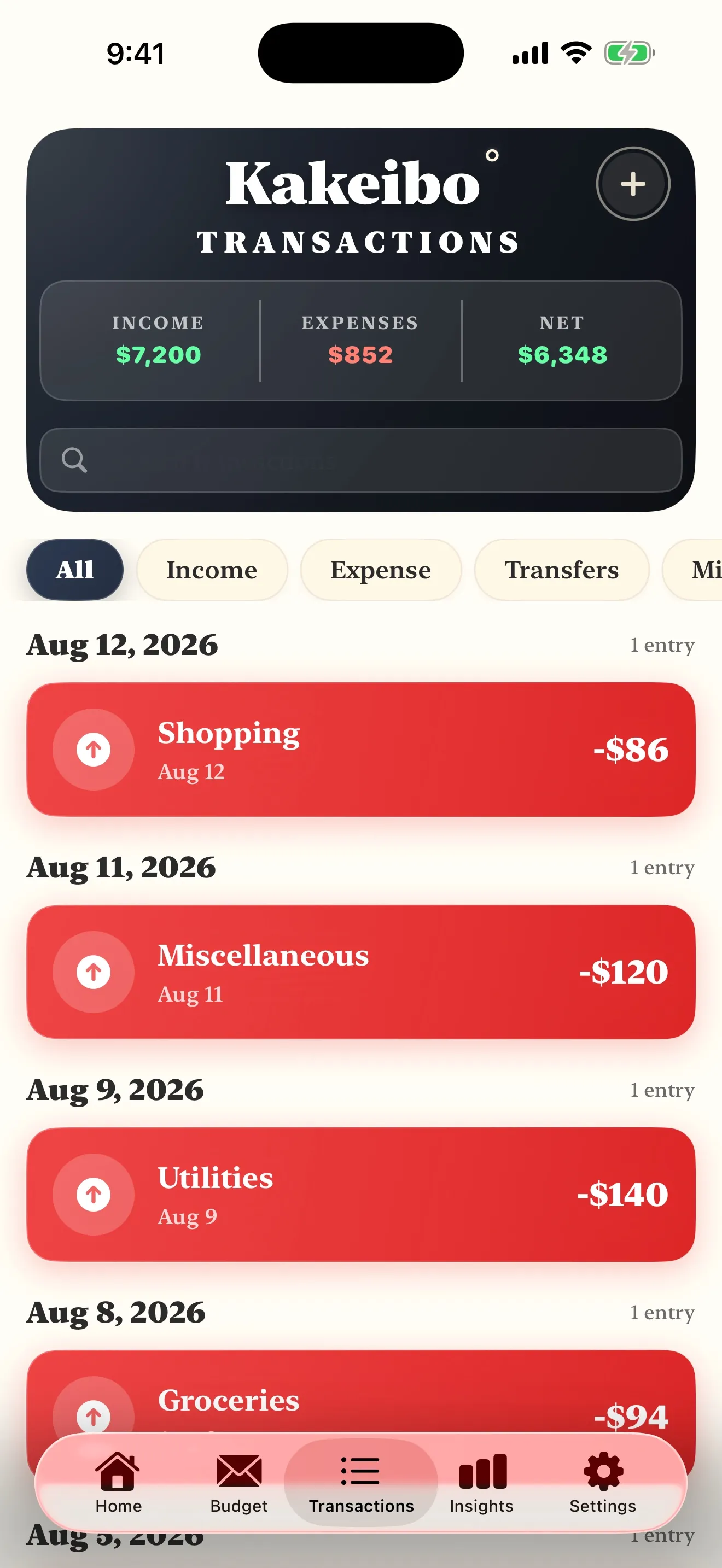
It is built on the four categories, the savings goal is set before the spending plan, the safe to spend figure is on the home screen, and the monthly reflection is in the app rather than assumed to be somewhere else. Entry is hand entry: an amount, a description, one of four envelopes. On the terms: Free on iPhone and iPad with ads: one savings goal, ten envelopes and twenty five transactions a month. Pro removes the ads and the limits.
The honest no answers matter more than the yes answers, because everybody prints the yes answers. It does not connect to a bank, which means it will never catch the purchase you forgot to enter, and if forgetting is your actual failure mode then a connected app is the better tool and we would rather say so. It is iPhone and iPad only, so if your household runs on Android there is nothing here for you. And it is a ledger rather than a forecaster: it will not smooth an irregular annual bill for you the way software built for that job does.
Why we will not rank the alternatives
There are other kakeibo apps on the App Store, some of them thoughtful, and we have not run a household month through any of them. A scored list assembled from store copy and screenshots is a review of somebody's marketing, and a page that presented one as testing would be doing exactly the thing this site was built to stop doing. If you want a second candidate, search the store for the method's name, put it against the checklist above, and give it a week of your real spending. That is a better test than anyone's star rating, ours included.
The same restraint applies to prices. We do not print figures for other people's products anywhere on this site, because a price we cannot attribute to a vendor's own published page is a price that goes stale quietly and misleads politely. Check theirs, on their page.
If the answer turns out to be no app
That is a perfectly good outcome and it happens often. The method predates every phone by about a century, and there is no version of kakeibo that requires software. Three honest exits, all of them written up here:
- Paper. The medium it was designed for, and still the best one for attention. The setup, page by page, is in the notebook guide.
- A spreadsheet. Better at arithmetic and history than any ledger, worse at the counter. Built column by column in kakeibo in Google Sheets, with no file to download.
- A printed page on the wall. For households where the money conversation needs to be visible rather than private, the argument is in printable budget pages.
Whichever you land on, the thing that decides it is not the software. It is whether the entry gets made while you are still standing there. If the reason you are shopping for an app is that the whole practice feels like it will eat your evenings, the real arithmetic is in how much time kakeibo actually takes, and it is less than most people assume.
Common questions
- What is the best kakeibo app for iPhone?
- The one we would point you at is our own, and that is exactly why this page gives you a checklist rather than a ranking. A kakeibo app has to do four things: let you enter a purchase in seconds at the counter, name the four categories as categories rather than as a generic list you build, hold the savings promise before the spending rather than after it, and carry the monthly reflection inside the app rather than assuming you keep a separate notebook. Judge any candidate, ours included, on those four.
- Do I need a kakeibo app at all?
- No. The method was published in 1904 for a ruled page and it still works on one. An app earns its place on exactly one argument, which is that it is in your pocket at the counter and the notebook is on the kitchen table. If your spending happens mostly at home, paper has no disadvantage worth naming.
- Should a kakeibo app connect to my bank?
- A kakeibo app specifically should not, because the entry is the method. A transaction that arrives on a list already sorted has never been a decision you made, and the pause at the counter is the mechanism the whole practice relies on. Automatic import is a genuinely better answer to a different problem, which is completeness, and we argue that comparison in full on its own page.
- Are free kakeibo apps any good?
- Free is normal in this category and it tells you very little on its own. The question worth asking is what the free tier is funded by and what it holds back, and whether both are stated before you install rather than discovered at the moment you hit a limit. Apple prints an In-App Purchases label on any listing that sells something, so check it and then read what the listing says the paid tier is for.
- What does your app cost?
- Free on iPhone and iPad with ads: one savings goal, ten envelopes and twenty five transactions a month. Pro removes the ads and the limits.
- Is there a kakeibo app for Android?
- Ours is iPhone and iPad only, and we are not going to recommend an Android app we have not used. The method itself is medium neutral, so the practical answer on Android is the same one we would give anyone whose phone we cannot help with: a notebook, or a spreadsheet built column by column, both of which we have written up.
Read nextThe whole library →
Where this one leads
You are choosing between a notebook and a phoneNotebook, spreadsheet or appWhat each medium is genuinely better at, with no ranking of competing apps we have never used.8 min readYou want to know what this costs you in timeHow much time it takesSeconds at the counter, minutes at the weekly check, and one longer sitting at the end of the month.8 min readYou live in a spreadsheet alreadyKakeibo in Google SheetsThe five columns, the three formulas, and the honest limit of a medium that is bad at the counter.8 min read
Check it against the list, then give it a real week
No ranking will tell you whether an app survives your own Tuesday. Eight checks, ten minutes on the store listing, then one honest week of entries at the counter.
Get the Kakeibo app freeiPhone and iPad · Free tier, no account needed